


· Photographer's Toolbox
· alloy photo
· John Beardsworth
· Capture Monkey
· lightroom-plugins.com
· Adobe Addons
extended-search-20220120.83.zip
· FAQ
· Version History
· Update Log via RSS

· Installation instructions
· “Donationware” Registration Info
· More Lightroom Goodies
· All-Plugin Update Log via RSS
· My Photo-Tech Posts
· My Blog
This plugin for Adobe Lightroom Classic fills in some gaps in Adobe Lightroom's image-search capabilities.
This plugin works in Lightroom Classic, and older versions as far back as Lightroom 3 (though some features depend on the version of Lightroom).
The same download works for both Windows and Mac. See the box to the upper right for the download link (in orange) and installation instructions.
Note: also see my powerful Data Explorer plugin, which lets you partition and group imgaes by 261 different data-related criteria. It's a different approach to search, but much more advanced and up-to-date than this Extended-Search plugin.
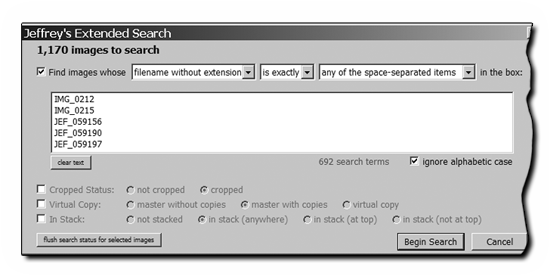
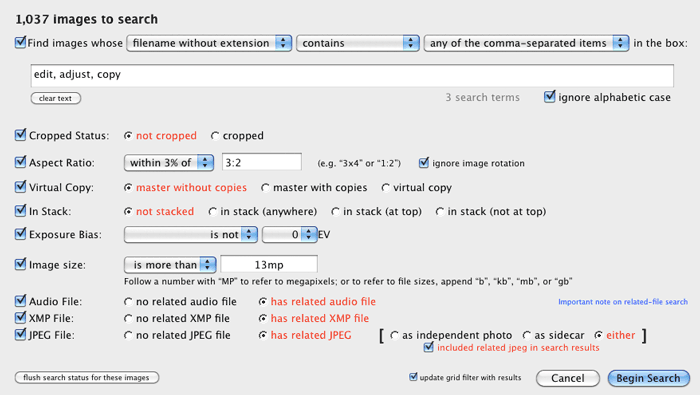
Lightroom offers a number of ways to search for images with its Library Grid filter; this plugin adds a few more. Invoking it via the “File > Plugin Extras > Extended Search” menu item, a dialog is brought up allowing various search criteria to be entered.
(The screenshot is just to give you an idea of what the plugin can do; the specific search shown is exceedingly specific and is not likely useful.)
Note: For another take on an “Enhanced Search” plugin for Lightroom, consider John Ellis' AnyFilter Lightroom Plugin, which from the excellent-looking docs appears to be both more powerful than my plugin, and devoid of the baggage associated with Lightroom 2, which was the version under which I developed this plugin (and is still supported by this plugin, for what that's worth).
Docs for my plugin continued further below where we have more room...
Text searching allows finding....
| images whose | filename
filename without extension leaf folder name copy name title caption scene |
+ | is exactly
starts with ends with contains is not does not start with does not end with does not contain |
+ | the text
any of the comma-separated items any of the space-separated items any of the line-separated items |
entered in the box |
Large amounts of text can be cut-n-pasted into the text-input box. In the example dialog screenshot above, I've pasted in the base filenames of 692 images (Lightroom's text-input box doesn't show a scrollbar, but you can use the arrow keys to move around inside.) I had used these images in the construction of a big photo book, and wanted to mark them as such in Lightroom, but until I wrote this plugin, I had no easy way to isolate just those images.
Other Search Criteria
Other search criteara may be used along with (or instead of) the text search:
- Template Text (see below)
- Cropped Status (cropped or not cropped)
- Aspect Ratio (within some threshold of an aspect ratio you specify)
- Virtual Copy (master without copies, master with copies, virtual copy)
- Stacking (not stacked, in stack anywhere, in stack at top, in stack at bottom)
- Exposure Bias (presence and amount)
- Image Size (megapixels or megabytes)
- Sidecar Presence (audio, XMP, JPEG)
How it Works
Before starting a search, you must be in the Library Module (Grid Mode recommended) with no images selected. You can use the Control-D / Command-D keyboard shortcut to deselect all images. All images showing in the grid/filmstrip will be searched.
Bring up the extended-search dialog (File > Plugin Extras > Extended Search..., or, enable plugin keyboard shortcuts to buy yourself some sanity), enter your search parameters, and start the search.
After the search completes, if you had enabled the “Update grid filter with results” option, you'll be shown the results automatically. Otherwise, see “Manually Isolating Results” below.
Template-Text Search
The “Template Text” search lets you create text using the template tokens that my plugins understand, filtering for images for which the result is or isn't blank.
For example, using “{Caption}” with “is blank” finds photos without a caption. Using “{FilenameNumber}” with “is blank” finds images whose filenames don't have a number. Using “{YYYY}” with “is blank” finds images without a capture date.
However, the real power of this is that you can use the {LUA} token to pragmatically choose the images you want. It's extremely powerful, though does require working with Lua program code.
As an example, this finds filenames with a number between 100 and 200, inclusive:
{LUA= type(FilenameNumber) ~= 'nil' and tonumber(FilenameNumber) >= 100 and tonumber(FilenameNumber) <= 200}
When the {LUA} code is being evaluated in the context of this plugin, nil, Boolean false values, and strings without visible characters are treated as “is blank”, while other values are considered “is not blank”.
Searching Again
To quickly run a search again on all the images in the selected source (e.g. in the folder or collection currently selected in the Library Module), thse keybaord shortcuts can make searching a breeze:
- Control-L / Command-L — to turn filtering off, thereby revealing all images in the source.
- Control-D / Command-D — to deselect all images, thereby allowing the plugin to search when invoked.
Manually Isolating Results
If you choose to not show the results automatically (or if you're still using Lightroom 2, where results can't be shown automatically), you can manually visit the “Extended Search” metadata item in the Library Grid filter to isolate the matched images, as illustrated here:
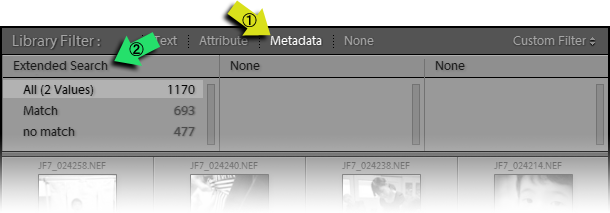
If you had been using the metadata filter for other things (e.g. to search only a range of dates), you can simply add “Extended Search” to a column at the end.
Select “Match” to par down the grid to just those images that matched. In the example above, selecting “Match” would isolate the matching 693 images in the grid.
Lightroom 2 Warning
There is a bug in Lightroom 2 that sometimes causes proper images to not show up even though the “Match” line is selected. Restarting Lightroom after the search brings up the proper results. This is fixed in later versions of Lightroom.
Availability
This plugin is distributed as “donationware”. I have chosen to make it available for free — everyone can use it forever, without cost of any kind — but unless registered, its functionality is somewhat reduced after six weeks.
Registration is done via PayPal, and if you choose to register, it costs the minimum 1-cent PayPal fee; any amount you'd like to add beyond PayPal's sliding fees as a gift to me is completely optional, and completely appreciated.
Note: a Lightroom major upgrade, such as from Lr10 to Lr11 de-registers the plugin in the upgraded version, so if you want to maintain registration, a new ($0.01 if you like) registration code is needed in the upgraded version. It makes for a hassle every couple of years, I know. Sorry. See this note for details.
For details on plugin registration and on how I came into this hobby of Lightroom plugin development, see my Plugin Registration page.
Version History
(
Update Log via RSS
)
| 20220120.83 |
Added the WEEKNUM token, along with DAYNUM, weeknum, and daynum. Whack-a-mole with PayPal's random changes. |
| 20211219.82 |
Warn when PayPal seems to have given a bogus code in the web-confirmation page. |
| 20210623.81 |
Added new search criteria: "Filename Extension", "Original Filename", "Original Filename Without Extension", "Original Filename Extension". Fixed that the Province template token did not respect the plugin-specific geo-privacy settings. Fixed an issue with the {Newline} token, and added {Comma}, {Hyphen}, and {Space} for good measure. Fixed a problem with filters on the {Keyword} token. |
| 20210415.81 |
Added "Lightroom internal UUID" to the items that can be searched. Added 'separated by' to the People token. Added the ImageViewDirection and ImageViewBearing tokens. Reworked the Keywords token to better accept filters. working around 'constant table overflow' error |
| 20201103.80 |
Added the PF filter to turn typographic fractions into plain-ASCII fractions. |
| 20201019.79 |
Updates for Lr10 Changed how the completion dialog is handled. Added the SpeedKnots token. Suggest case-insensitive matching with filename-related searches. |
| 20200810.78 |
Worked around an "unknown key captureTime" error. Added the {PlusCode} and {GeoHash} tokens. |
| 20200611.77 |
Added the Date/Time search item. It attempts to replicate the date/time form of an Exif date. Work around a Windows bug related to canceling out of the registration dialog. p>Some of the filename-related tokens could be incorrect in rare situations. |
| 20191216.76 |
Added a bunch of fields that can be searched. Added some extra debug logging to note whether the plugin is enabled. |
| 20191011.75 |
Added the LensInfo template token. Updated the Exposure token to allow customization. More token work: added {Urls}, and updated {ISO} and {Copyright} to allow customization. Added the {RelativeFolder} token. |
| 20190810.74 |
Fixed the SST1 and SST2 tokens. |
| 20190731.73 |
Updated the PublishCollectionName token (and CollectionNames and CollectionFullNames) to remove the MIRROR: prefix from the name that mirrored collections within my Collection Publisher plugin automatically get. |
| 20190708.72 |
Updated the keyword-related tokens to accept standard filters. Work around a bug that sometimes causes plugins to be disabled when starting Lightroom via clicking on a catalog file. Fix an "Unknown key: captureTime" crash. Added the GPSCoords token. Fixed a problem related to template tokens and photos without capture times. Added functions uc(), ucFirst(), lc(), and lcFirst() to the LUA token. |
| 20190106.71 |
Added the ability to search with a Lua pattern. Added the PEOPLE variable to the LUA token. Fixed a problem with the SpeedKPH token. |
| 20181015.70 |
Updates for Lr8 (Lightroom Classic CC Version 8). Added the special PP() function to the {LUA} token. Added hierarchical options to the Keywords token. Try to work around a Lightroom bug related to photo timezones and how Lightroom handles accessing plugin data. |
| 20181004.69 |
Added the 'nicknames' modifier to the {People} token. Added the SST1, SST2, and SS3 tokens to the template tokens that the plugin understands. Added the IptcDateTaken token. Clicking on the version number in the Plugin Manager now copies version info to the clipboard Updated the PublishCollectionName token to allow numeric arguments along the lines of the CollectionName token. Added the folowing template tokens: {home}, {desktop}, {temp}, {pictures}, {documents} Added the 'PCH' variable to the {LUA} tag. |
| 20180420.68 |
Fixed a bug when 'Token Examples' invoked in certain situations. Added a bunch of token filters: F2D F2S F2X B2D B2S B2X S2X A2D A2S A2X Added the these fields to those that can be searched: Headline, Instructions, Source, Job Identifier, Credit Line, Copyright, and Rights Usage Terms. Updated the Keywords token, and added the KWf function to the {LUA} token. Added the {NonSmartCollectionNames} and {NonSmartCollectionFullNames} tokens to the data templates that my plugins understand. |
| 20171019.66 |
Oops, more Lr7 stuff. |
| 20171019.65 |
Updates for Lr7. Better handle some character-encoding issues related to template tokens. Allow the "If Exists" feature of Templat Tokens to work with the PluginProperty token. Update registration support to handle a stupid bug at PayPal that PayPal refuses to fix )-: |
| 20170710.64 |
Fixed a bug introuded the other day in template tokens, related to Windows filenames. |
| 20170621.63 |
Added the Newline template token. Enhanced the FolderName token Added the "only if it has a value" feature to template tokens. |
| 20170309.62 |
Fixed a bug with the keyword tables in the LUA token. Switch the log-sending mechanism to https. Added the following tokens to the template tokens that my plugins understand: Artworks, ArtworkTitle, ArtworkCopyright, ArtworkSource, ArtworkCreator, ArtworkDateCreated, ArtworkInventoryNum, ISO8601Date, Weekday, Wday, weekday, wday |
| 20160919.61 |
Greatly speed up use of the LUA token. |
| 20160916.60 |
Added the "Template Text" item, which can be very powerful to those not scared of a little Lua programming. Try to avoid yet another place where Lightroom gets hung because it can't handle certain kinds of dialogs at the same time. |
| 20160103.59 |
Now more efficient in how it does searches and updates the catalog with the result. Search wasn't looking inside collapsed stacks; it now does by default, but you can turn it off. If a match is found within a collapsed stack, the plugin can't display the result due to a Lightroom plugin-infrastructure limitation, but a dialog will pop up telling you how to see the result. Added a note about my Data Explorer plugin, which for many tasks is a superior tool to this extended-search plugin. Lightroom 2 (obsolete for more than 6 years) is no longer supported, sorry. |
| 20151229.58 |
Lr6 only: automatically deselect any selection rather than aborting and telling the user to do it. |
| 20151228.57 |
Support PNG files in the library. |
| 20150206.56 |
In the POODLE-vunerability dialog, display a raw URL of a page on my site that discusses the issue, so that folks can be independently sure that the dialog is indeed from me and not malware. |
| 20141219.55 | Registration was broken on Lr2 |
| 20141019.54 | Windows Only: Add a one-time check for the POODLE security vulnerability, and alert the user if it exists. |
| 20140902.53 | New build system |
| 20140731.52 | Registration fix for Lr5.6 |
| 20140729.51 | Work around what I think is a bug in Lightroom when trying to upgrade a very old catalog to Lr5. The upgrade will flush the results of your most recent extended-search operation, and could take a minute or so on a large catalog. This should be a one-time operation. |
| 20140729.50 | Previous updates broke support on Lightroom 2 |
| 20140720.49 | More Creative-Cloud support. |
| 20140715.48 |
Fixed an issue with Creative-Cloud revalidation. |
| 20140712.47 |
Lr5.5 and later Creative-Cloud installs can now revalidate themselves if needed. |
| 20140710.46 | Sigh, had a bug in the Creative-Cloud support. |
| 20140708.45 |
Now supports Lr5.5+ Creative-Cloud Installs. |
| 20140704.44 | Sigh, introduced an error for some folks with the rebuild the other day. |
| 20140630.43 | Build-system update |
| 20140619.42 | Changed "no match" label to "No match". |
| 20140422.41 |
Fixed a bug in the "smoother revalidation" stuff recently added. |
| 20140417.40 |
Make the revalidation process smoother, especially for folks using Lr5.4 and later. |
| 20140204.39 | Added some extra debug logging to track down a problem. |
| 20140129.38 | Build update. |
| 20130613.37 | Better support for plugin revalidation. |
| 20130611.36 | Yet another Lr5 update |
| 20130524.35 | Apparently, a recent change broke things on Lr2, which some folks apparently still use. |
| 20130501.34 | Update for Lr5 |
| 20130412.33 | Build system update. |
| 20130328.32 | Fix for the registration system. |
| 20130209.31 | More build-system maintenance |
| 20130206.30 | Tweak for my registration system |
| 20121012.28 | Added support for snapshot-name search (in Lr3+) |
| 20120815.27 | Bug fixes and tweaks to the previous update. |
| 20120814.26 |
Can now search for XMP and JPEG sidecars. If a search is canceled, don't update the filter with partial results... just cancel. |
| 20120714.24 | Added the ability to filter on images with audio sidecars. |
| 20120608.23 | Fix an "attempt to perform arithmetic on field" error. |
| 20120526.22 |
Update to handle the Mac App Store version of Lightroom. |
| 20120518.21 |
Megapixel search was broken; added some extra debug logging. Tweak for Lr4.1RC2. Enhanced the send-log dialog to hopefully make reports more meaningful to me, yielding, I hope, the ability to respond more sensibly to more reports. |
| 20120330.20 | Update to handle 4.1RC |
| 20120309.19 | Had broken registrations in Lr2; Update to the debug logging to better track down timing issues that might arise. |
| 20120304.18 |
More on the march toward Lr4, including upheaval in the code to handle Lightroom APIs being discontinued in Lr4. |
| 20120114.17 | More tweaks for Lr4b |
| 20120112.16 |
Update for Lr4 beta: explain in the plugin manager that the plugin can't be registered in the beta. |
| 20111210.15 |
Had issues with the registration button sometimes not showing. When doing a plugin upgrade, offer the ability to flush all the old copies of the plugin. Added a system-clock check and reports to the user if the system clock is more than a minute out of date. An incorrect system clock can cause problems with various kinds of communication and authentication with some of my plugins, so I've just gone ahead and added this to every plugin. |
| 20110810.14 | Added the ability to filter on a specific aspect ratio. |
| 20110620.13 | New build. |
| 20101028.12 | In Lr3, now updates the grid filter to display the results of the search. |
| 20100829.11 | Made the revalidation process much simpler, doing away with the silly need for a revalidation file. |
| 20100820.10 | Discovered a bug in my plugin build system that caused horribly difficult-to-track-down errors in one plugin, so am pushing out rebuilt versions of all plugins just in case. |
| 20100625.9 | Yikes, shaking out some more build issues. |
| 20100624.8 | Discovered a nasty build bug; pushing a new version in case it affects this plugin. |
| 20100516.7 | Update for the Lr3 beta. |
| 20100315.6 |
Completely changed how the one-click upgrade applies the newly-downloaded zip file, in the hopes that it'll work for more people. Rather than unzipping over the old copy, it now unzips to a temporary folder, then moves the old folder out of the way and the new folder into place. Prior versions' folders are now maintained (with the version number in the folder) in case you want to revert a version; you may want to clear them out from time to time. Of course, it won't take affect until you try to upgrade after having upgraded to or beyond this version. Wholesale changes that attempt to honor the user's locale settings for numeric display (e.g. Europeans writing 3,14156 for pi). I've probably missed some spots, so let me know if you find some. |
| 20091214.5 | Added the "image size" row, where you can search via file size on disk, or post-crop size in megapixels (the latter offering a fine-grained search complement to my megapixel-sort plugin. |
| 20091205.4 | Minor internal debugging tweaks. |
| 20091202.3 | Added an Exposure-Bias row, and fixed a bug that caused the search to fail if the text row was not included in the search. |
| 20091022.2 | Added a first draft of some rudimentary support for Lightroom 3 Beta. See this important note about plugin support in Lightroom 3 Beta and Lightroom 3, including future plans for features and my registration system. |
| 20091017.1 | Initial public release. |
Wonderfully useful plugin!
Any plans on expanding the searchable fields to EXIF data and adding support for numeric value operations (less than, greater than, between, etc.)?
Specifically, I would love to have the ability to search/filter by focal length ranges. Your Data Plot plugin is terrific, but a way to actually see what pics go with each range would be highly useful.
Judging by the posts on your Megapixel Sort Plugin page, as well as rumblings on various online forums, it seems I’m not alone in thinking the focal length range search to be a killer feature. It wouldn’t be quite as elegant as a dedicated plugin due to lack of multiple range support, but the versatility allowed by the general nature of the plugin would more than make up for it.
Thanks again for your efforts!
That’s a good idea… I’ll see what I can do. —Jeffrey
I’ve encountered a similar bug wherein images don’t show up in the grid. It usually happens when moving files around, and may have something to do with moving files while showing contents of sub-folders too. I wonder if the bug is related to this one.
Thanks Jeffrey for your nice plugins.
Is there a way you can incorporate into your “extended search” plugin the ability to search pictures uploaded to facebook via your facebook plugin?
I’m not sure what you mean… you can already pick “Uploaded to Facebook” in the grid filter… is there something else you’re looking for? —Jeffrey
Thanks so much.
I didn’t realize it was already in the grid filter. Simple and elegant.
Continue the good work.
Thanks so much for adding exposure-bias to the search. It’s a huge time-saver tracking down un-tagged HDR or bracketed images.
I gave it a quick write-up on my blog.
Chris
Wow! Great! I actually arrived to your site, while looking for a database schema of the lrcat, as I needed it for something very similar to this: I want to be able to move Picasa’s “starred” marks over to Lightroom in some fashion (don’t ask, I have a twisted workflow, but I like it 😛 ) and was contemplating writing a python script for that. I might still do that sometime, but this really gets me there today (the other half was basically done – getting the list of starred files from Picasa). Thanks!
Hi Jeffrey,
I am writing from the San Francisco Bay Area. Since you have written several expanded search programs for Lightroom 2.x I wanted to ask you if there is any way to search for original raw files in the catalog that have had no modifications made to them, i.e. have only been imported? Also is there a way to search for particular presets that have been applyed to images? I created a custom sharpening preset that I applyed to some images that is too strong and I would like to search for only those and apply a lesser amount. Thanks, Larry
It’s not possible in LR2, but will likely be possible in LR3 to find images whose settings exactly match those in a preset. It’s not possible to inspect a photo’s history with a plugin, so once further adjustments have been made after applying a preset, a plugin won’t be able to find the connection. —Jeffrey
Just wanted to thank you for the plugin. I’ve been experimenting with HDR using bracketed shots and was going nuts trying to find a way to search for those shots. being able to use Exposure Bias as a search parameter really helped a lot!
Love your plug-in! It saves me so much time finding selected photos of brides! Thank you so so much!!!
Thank you for the plugin. I need to make searchable the “category” and “other categories ” fileds in the IPTC data. Is it possible? Thenks – Max
No, sorry, plugins can’t do that. I know that the Lr4 beta has some extra sortable metadata, so perhaps check that out as a preview of what to expect, and if something you want is not there, submit a feature request. —Jeffrey
Great extension – as always 🙂
I problem: I have lost a few RAW files in the catalog – only the a JPGs left. Now I want to find all images from my cam with JPGs but no RAW. With this list, I can recover the RAWs from a backup. Any suggestions? Thx Thorsten.
Use the library grid filter to select all JPGs and add a keyword (say, “oops”) to them. Then select raw files and use Extended Search to find those that do have a related JPG of any kind, and be sure to include the JPGs in the result. Select the resulting photos and delete the “oops” keyword. Any image with “oops” on a keyword should now be a JPG that has no raw. —Jeffrey
Great Plugin, but got one “feature” under Lightroom4.1 I got an error from time to time (hard to tell when) telling me : InitPlugin:1544: attempt to perform arithmetic on field ‘?’ (a nil value) .
When this happened the only way to get a sort result is to decrease the number of pictures in your search….
Any help — any bugfix? I got a screenshot with this problem (don’t know how to put it here)…
Thx
Pham
I’d appreciate it if you could send a log next time you get that error. —Jeffrey
This plugin, like the other 3 of yours that I am using, works great. I’d just like to request 2 features:
1. Search/filter by the cropped orientation (portrait, landscape, square)
2. Search/filter by the cropped size of the long (or short) side.
I’m not sure if these would fit best in this plugin or separately, but filtering based on these criteria would be very helpful for selecting potental candidates for inclusion in some projects (e.g. a calendar where I want only landscape photos whose long size is at least 2750 pixels).
What do you think?
Thanks for your very useful plugins.
It’s a different approach to search, but check out my Data Explorer plugin. It does what you’re asking, and much more. —Jeffrey
Hi,
I am looking for a solution that will allow me to somehow score images in higher resolution than the current 5 stars in LR.
Is there a way to score images by let’s say 1-100 points and then search for images higher then n, in a certain range etc.
Appreciate any info.
Thanks,
Ron
Nothing presents itself… I can’t think of a numeric field you can update besides the rating. However, you might give this plugin a try… it offers as an example search “Captions starting with number greater than 500“, which is in the right ballpark. —Jeffrey
This is a minor request, but just wondering why “no match” is in lowercase while “Match” starts with an uppercase. It doesn’t change any behaviour, but would really like the values to be “All (2 Values)”, “Match” and “No Match”. It’s just my OCD here, but would look so much neater. Thanks 🙂
Good point. I just pushed an update. —Jeffrey
I use zenfolio to get comments from users on the images they want to have delivered (sometimes several hundred to choose from). Your comment import works wonderfully. However, if I want to search these comments, see a list of them (e.g. those commented with “high priority”), or otherwise use them in workflow I have to click on each image individually to see the comment. Adding in some search or other method to expedite this would rock!
Unfortunately Lightroom gives no plugin access to the comments once the plugin passes the comments through to Lightroom. The plugin does at least keep a “most recent comment” data field that you can filter on in the Library Grid… —Jeffrey
Seems in searching “Title”, I cannot search for a blank/empty title — seems like something one might want to do??
Check out my Data Explorer plugin… you can easily identify blank titles with it. &mash;Jeffrey
Hi,
I am looking for a solution that will allow me to isolate odd number images and even number images (in a same folder), to process them in a different way; for e.g. pictures in black and white – odd number – and in colour – even number – after performing a scan in a book.
Thanks.
Jean-Claude
Using “filename without extension ending in 0,2,4,6,8” should grab you all the even images. You might mark all images with one color label, then do this search to get the even ones and mark those with another color label. Then the odd ones will have the first color, the even the second. —Jeffrey
Will this plugin allow me to search for photos taken in a specific month regardless of the year it was taken?
No, but my Data Explorer plugin does. —Jeffrey
Hello Jeff,
I have almost all of your plugins for LR.
Now all of them are showing expired. (after the latest update of LR) none is working.
How can you help me in solving this problem?
Regards
Please see the registration page section about a Lr major upgrade —Jeffrey
Hi Jeffrey, my last resort of help if Lightroom itself doesnt allow me to find/filter what I need.
I want to use your Folder Publisher on specific photos from location (keyword South Africa as some photos don’t have GPS information) and I want to keep all the adjustments I already did to some of the photos but want to find all the photos that don’t have any edits (exposure, highlight, shadows, blacks, lens profile corrections,…) and apply auto tune to those so at least they will be processed on the export as auto tune.
What is the best way to identify photos without adjustments in basic tab of develop module?
Closest I got is “EditCount” and set number according to certain threshold. I would rather have the possibility to create smart collection with keyword “South Africa” and “shadows” value 0 is false (no shadows edits in the photo). To those new photos with Auto Tune I would have to add a keyword to be able to identify them later.
South Africa trip had only 5000 ish Photos but to make a backup of 260.000 in lower res I need some happy batch solution.
EditCount is probably your best bet, but FWIW you can check for a lack of shadow adjustments with my Data Explorer plugin. —Jeffrey
Great Plugin! Would it be possible to make “Cached-Preview Size” also searchable? ie Cached-Preview Size > 10MB.
Btw Cached-Preview Size (bytes) is also not available in John Ellis’ AnyFilter plugin
thx Bernd
I suppose it’s possible to add this, though I’m not sure how useful it would really be. The cached previews for any one image are stored all together in one file, so I’m not sure what one can glean out of its absolute file size. —Jeffrey
Hi, just an idea for a next version, it will be great if we can search on hour, day, month, and combination of them.
Example 1 : view all pictures taken in March, June, etc. of any year
Example 2 : view all picture taken in the morning of any day of any year
Example 3 : view all picure taken in summer (June 21th to September 21th of any year), fall, winter and spring
Now I have to set dynamic collection based on date range, but I have to create an entry for each year.
Tank you for your excellent work!
(Sorry for the late reply!) You can effect the same kind of thing with my data-explorer plugin. —Jeffrey
Hello, is it possible to also search for the UUID (Lightroom’s internal unique identifier for the photo)? Background: I use the Collection Publisher and name the exported photos there using the UUID. This always remains identical, even if, for example, the date the photo was taken is subsequently changed. Now I get a list of customers with the selected photos and would like to select them quickly in the database. Many thanks in advance.
That’s easy enough to do… I’ve just pushed out a new version with it. —Jeffrey