


· Photographer's Toolbox
· alloy photo
· John Beardsworth
· Capture Monkey
· lightroom-plugins.com
· Adobe Addons
order-prints-20201103.74.zip
· FAQ
· Version History
· Update Log via RSS

· Installation instructions
· “Donationware” Registration Info
· More Lightroom Goodies
· All-Plugin Update Log via RSS
· My Photo-Tech Posts
· My Blog
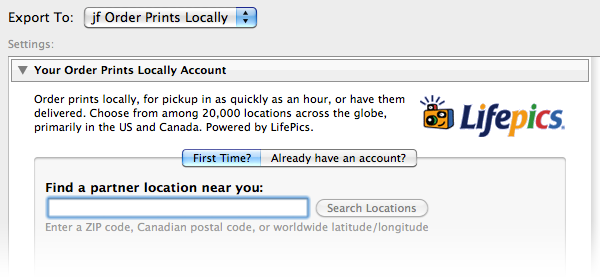
This plugin for Adobe Lightroom Classic allows you to have photos printed at a local retailer for delivery or pickup. It exports images to LifePics.com, which has a network of over 20,000 retail outlets all over the world, many of which can have prints ready for pickup within an hour.
You can search for a local retailer via US ZIP code or Canadian Postal Code, or latitude and longitude worldwide.
This plugin works in Lightroom Classic, and older versions as far back as Lightroom 3, though some features depend on the version of Lightroom.
The same download works for both Windows and Mac. See the box to the upper right for the download link (in orange) and installation instructions.
Version History
(
Update Log via RSS
)
| 20201103.74 |
Added the PF filter to turn typographic fractions into plain-ASCII fractions. |
| 20201017.73 |
Updates for Lr10. |
| 20201013.72 |
Fixed the "CAN'T YIELD IN LOCATION GROKER" crash. |
| 20191104.71 |
Updates for Lr9 (Lightroom Classic CC Version 9). Added the LensInfo template token. Updated the Exposure token to allow customization. More token work: added {Urls}, and updated {ISO} and {Copyright} to allow customization. Added the {RelativeFolder} token. |
| 20190810.70 |
Fixed the SST1 and SST2 tokens. |
| 20190731.69 |
Updated the PublishCollectionName token (and CollectionNames and CollectionFullNames) to remove the MIRROR: prefix from the name that mirrored collections within my Collection Publisher plugin automatically get. |
| 20190708.68 |
When not logged in, make it more clear what you're not logged into, and how to fix it. Added the PEOPLE variable to the LUA token. Fixed a problem with the SpeedKPH token. Finally figured out the “Assertion failed: packed” error. Added TempC and TempF to the template tokens that my plugins understand. Added the TempC and TempF tokens. Updated the keyword-related tokens to accept standard filters. Fix an "Unknown key: captureTime" crash. Added the GPSCoords token. Fixed a problem related to template tokens and photos without capture times. Added functions uc(), ucFirst(), lc(), and lcFirst() to the LUA token. |
| 20181017.67 |
Make the template-editing window a big bigger in the caption editor. |
| 20181015.66 |
Updates for Lr8 (Lightroom Classic CC Version 8). Added the special PP() function to the {LUA} token. Added the 'nicknames' modifier to the {People} token. Added hierarchical options to the Keywords token. Try to work around a Lightroom bug related to photo timezones and how Lightroom handles accessing plugin data. Added the SST1, SST2, and SS3 tokens to the template tokens that the plugin understands. Fixed a bug when 'Token Examples' invoked in certain situations. Clicking on the version number in the Plugin Manager now copies version info to the clipboard |
| 20171019.65 |
Oops, more Lr7 stuff. |
| 20171019.64 |
Update for Lr7. Does anyone actually use this plugin? |
| 20170309.63 |
Updated the Caption part of the dialog to show up to three lines of text, and the full text in the tooltip. Added {SpeedKPH} and {SpeedMPH} to the list of template tokens supported by my plugins. The {People} token wasn't working properly for some keywords without a registered birthday. Updated Twitter support to better count lengths of tweets that include URLs. Added ChildOf and DescendantOf filters to the {Keywords} and {KeywordsAll} template tokens that my plugins understand. Fixed a bug with the 'edit saved credentials' dialog. Fixed how custom {People} formatting works with people keywords that have no birthday associated with them. Try to avoid yet another place where Lightroom gets hung because it can't handle certain kinds of dialogs at the same time. Fix to get around a Mac display issue with Lr6 on OSX. Added Russian-langauge support for the People-Support Added the {FilenameNumber} token to the templates that my plugins understand. Some updates to support Lr2. Lr2 is sufficiently old that I will drop support for it soon. Added the following tokens to the templates that my plugins understand: FileModYYYY, FileModYY, FileModMM, FileModDD, FileModHH, FileModMIN, FileModSS, FileYYYY, FileYY, FileMM, FileDD, FileHH, FileMIN, FileSS. Fix for Lightroom 2. Support for older versions of Lightroom will be stopped soon. Got around a situation where Lighroom would crash duing an export of large images. Better dialog real-estate managment for the meatadata section. Fixed a bug with the keyword tables in the LUA token. Added Weekday, Wday, weekday, and wday to the list of template tokens that my plugins understand. Switch the log-sending mechanism to https. Added "ISO8601Date" to the template tokens that my plugins understand. Added the following tokens to the template tokens that my plugins understand: Artworks, ArtworkTitle, ArtworkCopyright, ArtworkSource, ArtworkCreator, ArtworkDateCreated, ArtworkInventoryNum |
| 20150206.62 |
In the POODLE-vunerability dialog, display a raw URL of a page on my site that discusses the issue, so that folks can be independently sure that the dialog is indeed from me and not malware. |
| 20141219.61 |
Use a compressed view on the Plugin Extras dialog if the screen is not very tall. Added extra logging to debug why Lightroom might fail to render for export |
| 20141019.60 | Windows Only: Add a one-time check for the POODLE security vulnerability, and alert the user if it exists. |
| 20140923.59 | Added the LrMD5, LrLocalization, LrSystemInfo, and LrMath packages to the {LUA} template token. |
| 20140902.58 | New build system |
| 20140731.57 | Registration fix for Lr5.6 |
| 20140729.56 | Previous updates broke support on Lightroom 2 |
| 20140720.55 | More Creative-Cloud support. |
| 20140715.54 |
Fixed an issue with Creative-Cloud revalidation. |
| 20140712.53 |
Lr5.5 and later Creative-Cloud installs can now revalidate themselves if needed. |
| 20140710.52 | Sigh, had a bug in the Creative-Cloud support. |
| 20140708.51 |
Now supports Lr5.5+ Creative-Cloud Installs. |
| 20140704.50 | Sigh, introduced an error for some folks with the rebuild the other day. |
| 20140630.49 | Build-system update |
| 20140613.48 |
Added date_diff() and raw_time_diff() functions to the special {LUA} token understood by the plugin. |
| 20140605.47 |
Add a note to the Keyword options to highlight that only exportable keywords are considered |
| 20140510.46 | A missing 'automatic destination' could cause the plugin to crash. |
| 20140509.45 |
Added new tokens to the template language the plugin understands: LrVersion, LrVersionMajor, LrVersionMinor, LrVersionRevision, LrVersionBuild, Location, CatalogName, CatalogPath, OperatingSystem, OS Added new token filters: NS and LO |
| 20140422.44 |
Fixed a bug in the "smoother revalidation" stuff recently added. -- Fixed a sublocation-related bug in the new geo-privacy stuff. 20140416.43 deal with new privacy stuff -- The {Empty} template token wasn't working properly.Make the revalidation process smoother, especially for folks using Lr5.4 and later. |
| 20140204.42 |
Enable a new feature internal to Lr5 for large exports that keeps the CPU from running too far ahead of the upload. Prior to this, Lightroom would go ahead and peg the CPU to pre-render all the images even if they weren't being uploaded at nearly the same speed. Now Lightroom pauses the behind-the-scenes rendering if it has gotten too far ahead of the upload. Added the “:EMBED” token filter to the template language. |
| 20130926.41 | Oops, fix a bug introduced in the previous update |
| 20130925.40 |
Added a bunch of tokens to the preset templates supported: ExportFormat, ExportColorSpace, ExportBitDepth, ExportQuality, ExportSharpeningLevel, ExportSharpeningMedia, IpernityUrl, GoogleDriveUrl, and TumblrUrl. The token-examples dialog had been broken. Also deprecated Folder and Path tokens in preference to FolderName and FolderPath tokens. |
| 20130909.39 |
Work around a Lightroom bug concerning the determination of whether a photo is offline. Moved the "Export with Smart Previews?" dialog section to a more-logical place in the order. Made big updates to the "Export with Smart Previews?" section; you can now pick to be asked whether to export via Smart Previews, and can differentiate between when the Smart Previews are "good enough" for an export and when they are not. Fixed the KW/KWE tables in template tokens; they had been broken when using load for the script. |
| 20130701.37 |
Work around a bug that causes the export-related progress bar to not show up right away. |
| 20130613.36 | Better support for plugin revalidation. |
| 20130611.35 | Sigh, previous update for Lr5 broke things for the Lr5 beta. |
| 20130611.34 | Yet another Lr5 update |
| 20130610.33 | Better logging to try to understand catalog-write-access contention under Lighroom's hood |
| 20130524.32 | Apparently, a recent change broke things on Lr2, which some folks apparently still use. |
| 20130520.31 |
Added the ability in Lr5 to export images even if the master image file is not available, so long as there's a smart preview available. |
| 20130501.30 | Update for Lr5 |
| 20130328.29 | Fix for the registration system. |
| 20130319.28 |
Fixed a possible plugin crash in Lr2 that might happen if the remote site's servers are failing. |
| 20130220.27 |
Added support for some new template tokens: FlagStatus (requires Lr4.1 or later), and for Lr3 and later, a bunch of IPTC extended metadata: AdditionalModelInfo, CodeOfOrgShown, DigImageGUID, Event, ImageSupplierImageId, MinorModelAge, ModelAge, ModelReleaseID, ModelReleaseStatus, NameOfOrgShown, PersonShown, PlusVersion, PropertyReleaseID, PropertyReleaseStatus, and SourceType. |
| 20130214.26 | Small fix for Lr2 |
| 20130209.25 | More build-system maintenance |
| 20130206.24 | Tweak for my registration system |
| 20121014.22 | Added a help dialog when encountering the mysterious 'handle in the wrong state' error. |
| 20120821.21 |
Updates to the environment in the {LUA} token (in the template tokens in my plugins) to include photoTime() and currentTime(), and other changes to match the updated docs at that link. . |
| 20120614.20 | Very slow uploads in Lr4.1 could cause the new progress bar stuff to blow up. |
| 20120608.19 | Fix an "attempt to perform arithmetic on field" error. |
| 20120526.18 |
Update to handle the Mac App Store version of Lightroom. Tweak for Lr4.1RC2. Enhanced the send-log dialog to hopefully make reports more meaningful to me, yielding, I hope, the ability to respond more sensibly to more reports. Added to the template tokens supported by the plugin: {FullMasterFile}, {FullMasterFolder}, {FullExportedFile}, and {FullExportedFolder}. |
| 20120330.18 | Update to handle 4.1RC |
| 20120309.17 | Update to the debug logging to better track down timing issues that might arise. |
| 20120301.16 | Oops, broke new logins in the previous big update... doh! Sorry. Fixed. |
| 20120229.15 |
Files that are offline are now detected before an export/publish begins, and if there are any, offers the option to abort the export, or just skip the offline ones. This is a lot more clear than the "dng_error_file_not_found" error you get from Lightroom if you follow through with an export attempt of an offline image. More on the march toward Lr4, including upheaval in the code to handle Lightroom APIs being discontinued in Lr4. Bumped up the minimum Lr3 version to Lr3.5, to ensure we've got those bug fixes. Lr2 and Lr4 are still supported, of course. |
| 20120114.14 | More tweaks for Lr4b |
| 20120112.13 |
Update for Lr4 beta: explain in the plugin manager that the plugin can't be registered in the beta. |
| 20111210.12 |
When doing a plugin upgrade, offer the ability to flush all the old copies of the plugin. Had issues with the registration button sometimes not showing. Added a system-clock check and reports to the user if the system clock is more than a minute out of date. An incorrect system clock can cause problems with various kinds of communication and authentication with some of my plugins, so I've just gone ahead and added this to every plugin. |
| 20110712.11 | Had a minor plugin-crashing boo-boo in the previous update. |
| 20110711.10 |
More on the catalog-access errors that some are getting with Lr3. Really long captions could cause a stack overflow. |
| 20110703.9 | For Lr2, fixes a 'must be called inside withReadAccessDo' error I'd recently introduced. For Lr3, tries to address a similar error that seems to pop up in rare cases. |
| 20110623.8 |
There's a bug in Lightroom that causes it to sometimes include private keywords in exported copies. The plugin now detects these situations and alerts you to them, allowing you to avoid a privacy blunder. |
| 20110301.7 |
The check-for-updates stuff didn't work properly... fixed. Fixed a bug whereby one couldn't export via preset to an account different from the currently-logged in account. |
| 20110113.6 | Added {CroppedWidth} and {CroppedHeight} to the template tokens used by my plugins. |
| 20101208.5 | Update to handle a change in LifePics's API. |
| 20100829.4 | Made the revalidation process much simpler, doing away with the silly need for a revalidation file. |
| 20100820.3 |
Discovered a bug in my plugin build system that caused horribly difficult-to-track-down errors in one plugin, so am pushing out rebuilt versions of all plugins just in case. |
| 20100817.2 |
Added code to allow plugin revalidation after having been locked due to a bad Lightroom serial number. |
| 20100809.1 | Initial public release. |
trying to get this lifepics plug-in to activate. Won’t let me because it says using a invalid ser # which is not the case? Have other plug-in’s installed and working no problems says I must re-validate plug-ins?
plug-in is currently disabled.
must be a work around? hate to call Adobe and wait and wait and wait
If the plugin says you have an invalid serial number, you certainly do. Check Help > System Info to make sure you’ve got your personal Lr serial number actually installed, then restart Lightroom. —Jeffrey
What a superb plug-in concept.
I have been using another high volume online retail printer and find the interim Hard disk export then upload process burdensome.
I am in Ontario, Canada. I dunno if I will like Rexall printing but I am going to try it.
thnx Jeffrey
This plugin asks about the ZIP only in the First Time tab. I’d like to pick the order location at the time of each export — possible?
Not easily… the way the company has things set up, you have the location associated with your account, and they don’t allow an app to change the location, so you have to visit the web site to do so. Seems very kludgy to me. —Jeffrey
Just installed your “Order Prints Locally” plugin to give it a try. LR4 plug in manager tells me the plugin is installed properly but it doesn’t show up under my list of Publishing Services. I’ve shut down LR4 and restarted it after installing the plugin but still can’t see it from my library module. Please advise.
It’s not a Publish plugin, only traditional Export. Select the images and click the “Export” button in the lower left of Library. —Jeffrey
I read LifePics is all over the world – but I can see no affiliates in Europe – none of its countries – anywhere.. Did I overlook something..?
Or is it just lies and mean bluff of LifePics to let believe they have lab-partners in Europe when actually they don’t ? Or is it moor subtle..?
Hey Jeff,
Are there any other companies like lifepics that can find local printing houses (as well as online?) I think Lifepic is no more when I punch in a zip code on their website I get all kinds of errors. (yes I realize this isn’t directly related to your plugin but hey… if it don’t work on the website a new alternative could be beneficial).
Any plans to create another “lifepics” replacement plugin if there would be one?
I’ve not plans… I don’t know about other companies that might be out there. Frankly, I don’t know much about LifePics either…. I built the plugin, but never got around to submitting the paperwork to collect whatever commission I was supposed to get, so it’s sort of been out of mind and I don’t even know how popular it is…. —Jeffrey