My Tech-Related Photography Posts
- My Lightroom-to-iPad Workflow
- Lightroom Goodies (lots of plugins)
- Digital Image Color Spaces
- Online Exif (Image Data) Viewer
- Jeffrey's Autofocus Test Chart
- Photoshop Calendar-Template-Building Script
- How to Prepare Photos for an iPad
- A Qualitative Analysis of NEF Compression
- Tripod Stability Tests
more...
This is a followup to my previous post on testing a Transcend 4GB 120x Compact Flash card. In that post, I found that its write speed was actually slower than the 80x version of the same card (tested in a separate post).
I contacted Transcend Japan about the slow card, and to their credit they replied very quickly at each step along the way. However, their initial reply was full of wishy-washy ways to avoid the issue, saying that there could indeed be situations where tests shows the 80x is faster than the 120x and that the speed rating they give is only for relative comparison only, blah blah blah.
I replied that since the testing conditions were exactly the same between my tests of the two cards, the one rated 50% faster turning out to be actually slower was clearly a problem with the card. I made it clear that I didn't actually expect a 50% speed increase, but that the slower result was an indication of a problem.
So, they said to send it in and they'd test it. They didn't offer to pay for shipping, and I didn't push it, so I overnighted it to them at my own expense. I sent them the card (model number TS4GCF120; serial number 129542-0419) last week and heard nothing from them until a new one showed up today: serial number 130417-0103.
I ran one test with the card as I received it (that is, I didn't format the card first), and then I ran the test again after having formatted it directly in the camera (Nikon D200). The latter test replicates exactly what I'd done previously.
In all cases, the tests are with a Nikon D200 in manual-focus, manual-exposure (1/200, wide-open aperture) mode at ISO 1600. Measurements were taken from audio-recordings using Adobe Audition. The tests were of uncompressed raw (“NEF”, uncompressed) images, which are about 15.6 megabytes each.
| Card Tested | Initial frames at 5 fps | Subsequent Frames | Maximum Write Speed |
|---|---|---|---|
| Transcend 4GB 80x | 22 | 2.156 sec/frame | 7.23 MB/sec |
| Transcend 4GB 120x Previous card (in-camera format) | 22 | 2.265 sec/frame | 6.88 MB/sec |
| New card (as-received) | 22 | 2.209 sec/frame | 7.06 MB/sec |
| New card (in-camera format) | 22 | 2.108 sec/frame | 7.40 MB/sec |
So, the new card 120x can be slightly faster than the 80x card, but this difference is within the margin of variability of the test: another test of the 120x card under conditions identical in every respect to the final-row test shown above, came in with an average subsequent-frame write speed of 2.168 sec/frame, making it slower than the 80x card's test.
Conclusions
In the end, both the 80x and the 120x card are plenty fast enough for me and the D200. What this test shows is that the 80x and 120x cards are essentially identical under my use conditions, and thus the 120x card is not worth the cost premium that its “120x” label garners. At least, in my case, the cost premium was less than $20, so while disappointed, it's not that bad.
So, I recommend the 80x version of Transcend compact-flash cards, as they're an excellent value compared to comparable products from San Disk and Lexar.
Two weeks ago I complained that I was sick of being sick, and the very next day I felt great. Well I'm sick again, so maybe complaining will help again?
I started to have a mild cold on Thursday, and just this morning I was thinking that I'm finally better when boom, this afternoon it takes a nosedive and now I feel more miserable than before. Yuck.
So here goes again: I'm sick of being sick!!!!!!
Oh, what a fun day. Too many toys! But not for Anthony.... for me!
I try to be prudent with our funds, so I don't buy a lot of “toys” for myself. Last year I got an iPod. The previous year I got Photoshop and other Adobe “Creative Suite” software (although at a nice discount, thanks to the kindness of some friends). I probably have a number of other things on which spending money I've conveniently forgotten, but in general, my idea of pampering myself usually centers more around Orville Redenbacher's Smart Pop Microwave Popcorn and a beer than trendy electronic gadgets.
However, last month when our old camera broke, I indulged myself and bought a Nikon D200 digital SLR and some stuff to go with it: a couple of 4GB compact flash cards, and a camera bag and tripod.
I needed some other things, but the prices here in Japan are sometimes ridiculous, so I ordered a bunch of things in the US (how did people survive before the Internet?) and had them shipped to my brother, who kindly assembled them all into a package and sent to me.
It arrived today!
(On top of this, Canon replaced the broken camera with a newer model, which arrived yesterday, but that's for a different post.)
Here are my new toys....
Garmin GPSmap 60CS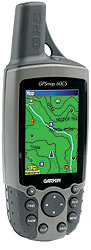
|
I got this GPS unit so that I can geoencode my photos. I can hook it up directly to the D200 (it has a special GPS-data port), but that would be a clumsy arrangement (and require a $100 cable to boot!). Rather, when I'm out with the camera, I'll have it keep a running log of location+time snapshots, and synchronize with the pictures during postprocessing. I just have to make sure that the camera clock is in sync with the GPS unit's clock, and then I can extract the photo location from the log at the time the picture was taken, and insert that geodata into the picture data. This'll be particularly fun when we go to Malaysia next month. My first impression of it is that it's bigger than I imagined. Also, the manual, although being 97 pages long, is extremely light on specifics, which I already find frustrating to no end. For example, in the settings for the position log thing, it has an option for how often to save a location snapshot to the log: by time (every such-and-such seconds), by distance (after you've moved such-and-such hundred meters), or auto (which means what? The manual doesn't say!!!!) As another example, there's a setup field for “Map Datum”, with 113 different selections, with names like “Tokyo”, “Afgooye”, “ARC 1960”, “WGS 84”, “Sapper Hill '43”, “Old Hawaiian”, etc. I have no idea what any of these mean. Living in Japan, should I use “Tokyo”? The manual says absolutely nothing about what any of these are. Nothing. Frustrating. It comes with US maps built in, but has room to download others. I must see if I can get Japan maps to put on it. [Update: more comments on it here ] [Update: most-excellent Japan map for Garmin GPS units. Free. ] [Update: this unit has been replaced in my bag by a Garmin eTrex Legend HCx ] |
Nikon SB-800 Flash

|
This is a big hunkin' flash unit that I can aim (e.g. to bounce light off the ceiling for softer lighting), or even use off camera, as it can be controlled wirelessly by the D200. It's really beyond my skill, so I have some learning to do. |
Lumiquest Pocket Bouncer

|
This thing unfolds and sticks on top of the flash to bounce the light, creating a softer, less harsh, more diffuse light than a direct flash. It's useful when you don't have a white ceiling to bounce light from. It's supposed to bounce the light at 90 degrees from the face of the flash (using the flash facing up), and I would suppose that this means that the angle of the reflecting surface should be 45 degrees, but it's been built with the pre-folded angle at about 30 degrees. I just don't get it. |
| Some books.... | |

Understanding Exposure [UPDATE: Understanding Exposure is one of the worst books I have ever seen. It's extremely poorly written, and even if you can get past that, presents a woefully scattered and incomplete presentation of what one needs to learn. It's truly bad in any sense I can think to measure.] |
 Photoshop Filter Effects Encyclopedia |

Photoshop Photo Effects Cookbook |

Photoshop Blending Modes Cookbook for Digital Photographers |
Rubber Eyecup
|
It may seem like a small thing, but I'm really happy with this $7 accessory for my D200. It blocks out more light to give me a better view through the viewfinder. Frankly, I wish it were larger (extended out from the camera body more), and made of softer rubber, but compared to the stock eyecup, this one is so much better. |
I also picked up a spare battery for the D200, since the price in the US is only a bit more than half the price here.
Anyway, tonight I'm overflowing in new toys and have many manuals and books in need of reading.....

Nikon D200 + Nikkor 18-200mm f/3.5-5.6 VR @ 18 mm — 1/320 sec, f/5.6, ISO 125 — map & image data — nearby photos


The main gate of the Heian Shrine, Kyoto Japan
thirty seconds from my front door 🙂
It seems it's been months without a sunny day, so when we finally had one last week, Anthony and I took a walk to a nearby playground, and on the way I gave the wide end of my new 18-200mm zoom a go. I was on my back on the ground for this shot. Anthony didn't know what was going on, but after a bit of reflection, he got on his back and joined me.

What a wasted day.
| 9:00 am | Babysitter arrives |
| 9:45 | Depart for Kyoto DMV, for an 11:00am filing deadline |
| (drive 55 minutes) | |
| 10:40 | Arrive at Kyoto DMV |
| 10:50 | File paperwork to obtain my Japanese driver's license (window #8, main building, upstairs).
This was my third trip, so I knew I had all the paperwork needed:
Because I previously had a Japanese driver's license, they'll let me convert my US license to a new Japanese one without taking the written and driving tests, which I think is just wonderful. |
| (wait 57 minutes) | |
| 11:47 | Application has been accepted, now need to do a few more thing to complete... |
| 11:49 | Paid $60 or so of fees (window #2A, main building, downstairs). |
| 11:52 | Took a simple eye test (room #3, main building, downstairs). |
| 11:57 | Re-filed paperwork at original place (window #8, main building, upstairs). |
| (wait 7 minutes) | |
| 12:05 | Am told to appear at window #6 (main building, downstairs) at 2:10pm. Bring $15 and a pen. License will be ready, the paper says, by 3:45pm. |
| (wait 1 hour 45 minutes; have lunch with Fumie, who was there to start her paperwork as well) | |
| 1:50 | I start to wait at window #6. I'm first in line. |
| (continue waiting another 24 minutes) | |
| 2:10 | Window #6 remains closed; I worry that I'm in the wrong spot. |
| 2:14 | Window #6 opens, lady makes a long announcement to assembled unwashed masses. |
| 2:16 | Lady repeats long announcement. |
| 2:18 | I get some (different)
paperwork from lady, and inspect. I find what looks like an error with my name, so go to window #4 (main building, downstairs) as per the announcement and find that it's not a mistake, but the best they could do with my long name. (Most Japanese names are three to five characters long, and “JEFFREY ERIC FRANCIS FRIEDL” is a bit longer than they're used to). |
| 2:19 | Go to window 2A again and pay another $15. Also pay another $10 as a “donation” when so requested, to the local “traffic safety association”. |
| 2:20 | Go to room #7 (main building, downstairs) to have picture taken for license. Amazingly, all the others who were ahead of me had already finished. (I went from first in line to last in line when I checked about the potential name mistake.) A congenial man with a very pleasant manner very quickly took my photo. |
| (wait 42 minutes) | |
| 3:02 | Someone makes an announcement and a few people start heading to a test-taking room. Congenial photo-taking man is there, so I head over to him to ask where I should be at 3:45 when my license is supposed to be ready, but before I reach him he sees me and smiles, and waves me into the room along with a dozen or so others. I worry I'm going to have to take some kind of test! |
| 3:04 | Congenial man explains how
to fill out one of the papers we had (basically, “write your name and
the date, stamp with your personal seal in these spots”), then calls
people up to pick up their license.
My number, 804, was called first:  I notice that they couldn't fit my full name on the front; it's hand written in full in the notes section on the back. Although I was licenced in Japan for many years before, since it expired, this is now again treated as my first license. Therefor, it's good for a maximum of three years before I have to renew. Specifically, it's good until one month past your third birthday after being issued. Since my birthday is in two months, it's good for two years two months from now. |
| 3:10 | Head home.... |
| (drive 50 minutes) | |
| 4:00 | Arrive home, wondering why it all had to be such a long, complicated ordeal. I'm so lucky, at least, that I didn't have to take the two tests (written and driving) that most people have to take when converting a foreign license. Fumie's never had a Japanese driver's license, so she'll have to take them. Ugh. |